
The FBI Just Issued a Warning About Signal and Messaging Apps — Here’s What It Actually Means
There’s a quiet misconception floating around out there—one I hear from clients all the time:
“I’m safe. I use encrypted apps.”
That belief just took a hit.
The Federal Bureau of Investigation, alongside Cybersecurity and Infrastructure Security Agency, put out a public warning that cuts straight through the marketing noise: your encrypted messaging app isn’t the problem—you are the entry point.
Let’s unpack what’s actually happening here, without the fluff.
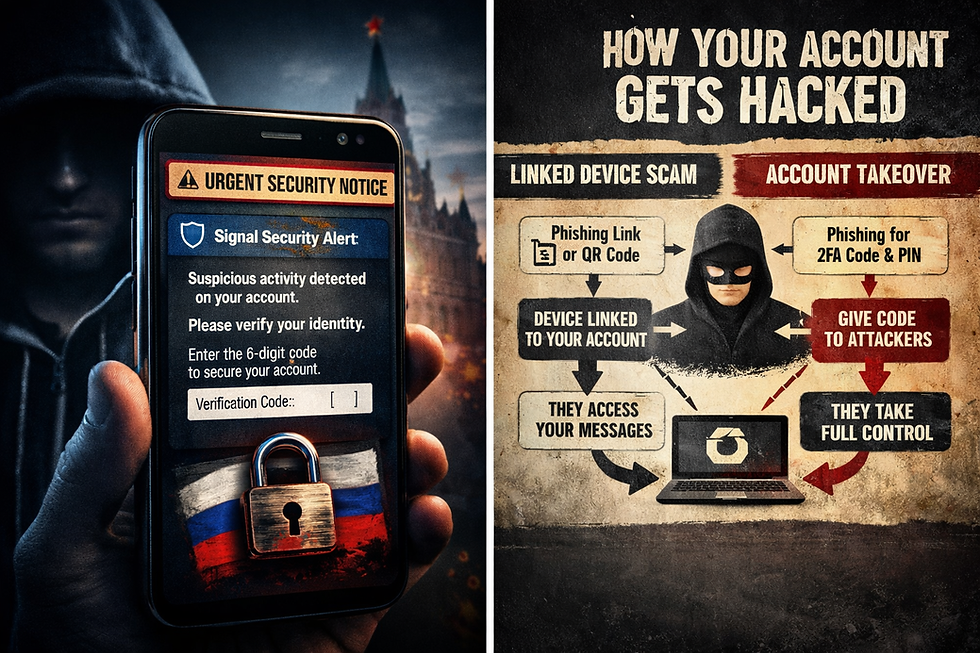
The Lie People Believe About Encryption
Encryption works. Signal, WhatsApp, Telegram (when it is turned on)—they do what they claim.
But encryption only protects the message in transit.
It does nothing if someone walks through the front door and sits down inside your account.
That’s exactly what this campaign is doing.
Russian intelligence-linked actors aren’t cracking encryption. They’re not hacking servers. They’re not breaking math.
They’re tricking people.
And it’s working—at scale.
Thousands of accounts have already been compromised globally.
How They’re Getting In (Two Clean, Simple Plays)
1. The “Linked Device” Trick
This one is slick.
You get a message that looks like it’s from support. It feels urgent. Something about suspicious activity.
There’s a link. Maybe a QR code.
You click it.
That’s it.
Behind the scenes, you’ve just authorized their device to link to your account. Now they’re reading your messages in real time while you keep using the app like nothing happened.
No alarms. No lockout.
Just a ghost sitting next to you.
2. The Full Takeover
This one is more aggressive.
They message you pretending to be support. They say there’s a login attempt. They send you a verification code.
Then they ask for it.
If you hand over that code—or your PIN—you’ve just handed over the keys.
You’re locked out. They’re in.
And now they can:
Read everything
Message your contacts
Launch secondary scams using your identity
All from inside your account.
The Messages Look Real — That’s the Point
Here’s the uncomfortable truth: these aren’t sloppy scams.
They’re tailored. They mimic real system messages. They create urgency. They tell you not to tell anyone.
Sound familiar?
That’s not coincidence. That’s tradecraft.
Examples include messages like:
“Suspicious activity detected—verify now”
“Login attempt from another device”
“Security update required”
All engineered to get one thing from you:
A reaction.
Because once you react, you stop thinking.
Why This Matters More Than People Realize
This isn’t just about losing a chat account.
If you’re a:
Executive
Attorney
Journalist
Investor
Public figure
—or someone with anything worth knowing—
this becomes a surveillance problem.
Once they’re inside:
Your conversations are exposed
Your network is mapped
Your vulnerabilities are identified
And in some cases, this turns into something much worse:
Blackmail.
I’ve seen it firsthand. It doesn’t start with threats. It starts with access.
The Real Weakness: Social Engineering
The FBI says it plainly:
Phishing bypasses encryption entirely.
That’s the whole game.
You can have perfect security architecture—but if someone convinces you to open the door, none of it matters.
This is why I tell clients:
You’re not being hacked. You’re being handled.
What You Should Do
Let’s keep this grounded. No 40-step checklist. Just what actually works.
1. Stop Treating Messages Like Truth
If you didn’t initiate it, it’s suspect.
Full stop.
No legitimate support team will ever DM you asking for codes or credentials. Ever.
2. Never Share Verification Codes
Not with anyone.
Not even someone claiming to be the platform.
Those codes are the keys to your account. Hand them over, and it’s game over.
3. Slow Down
These attacks rely on urgency.
“Act now.”“Immediate threat.”“Verify immediately.”
That pressure is the weapon.
Take a breath. Step away. Check independently.
4. Check Linked Devices
Most people never look.
You should.
If there’s a device you don’t recognize—remove it immediately.
5. Verify Outside the App
If something feels legitimate, confirm it through a different channel.
Call the person. Email them. Use a known contact method.
Don’t reply inside the same thread that might already be compromised.
6. Be Careful What You Say—Even on “Secure” Apps
Once someone is inside your account, encryption doesn’t matter.
Assume anything sensitive could be exposed if access is lost.
The Bigger Picture
This warning isn’t just about Signal.
It’s about a shift in how attacks are happening.
Less technical. More psychological.
Less “hackers in hoodies.” More operators who understand people.
And that’s where most defenses fall apart.
Final Thought
If there’s one thing to take from this:
Security and privacy isn’t only about the app you use. It’s about how you behave inside it. Security and privacy are close bed fellows, and from a privacy perspective Signal is still a great app I recommend.
The strongest encryption in the world won’t protect you from a bad decision made in a hurry.
And that’s exactly what they’re counting on.


Comments